GPT-Realtime-2 launched May 8, 2026. Here's the WebSocket path to a live phone number without SIP, plus a real cost breakdown and platform comparison.
- GPT-Realtime-2 runs GPT-5-class reasoning with a 128K context window and scored 15.2% higher on the Big Bench Audio benchmark than its predecessor.
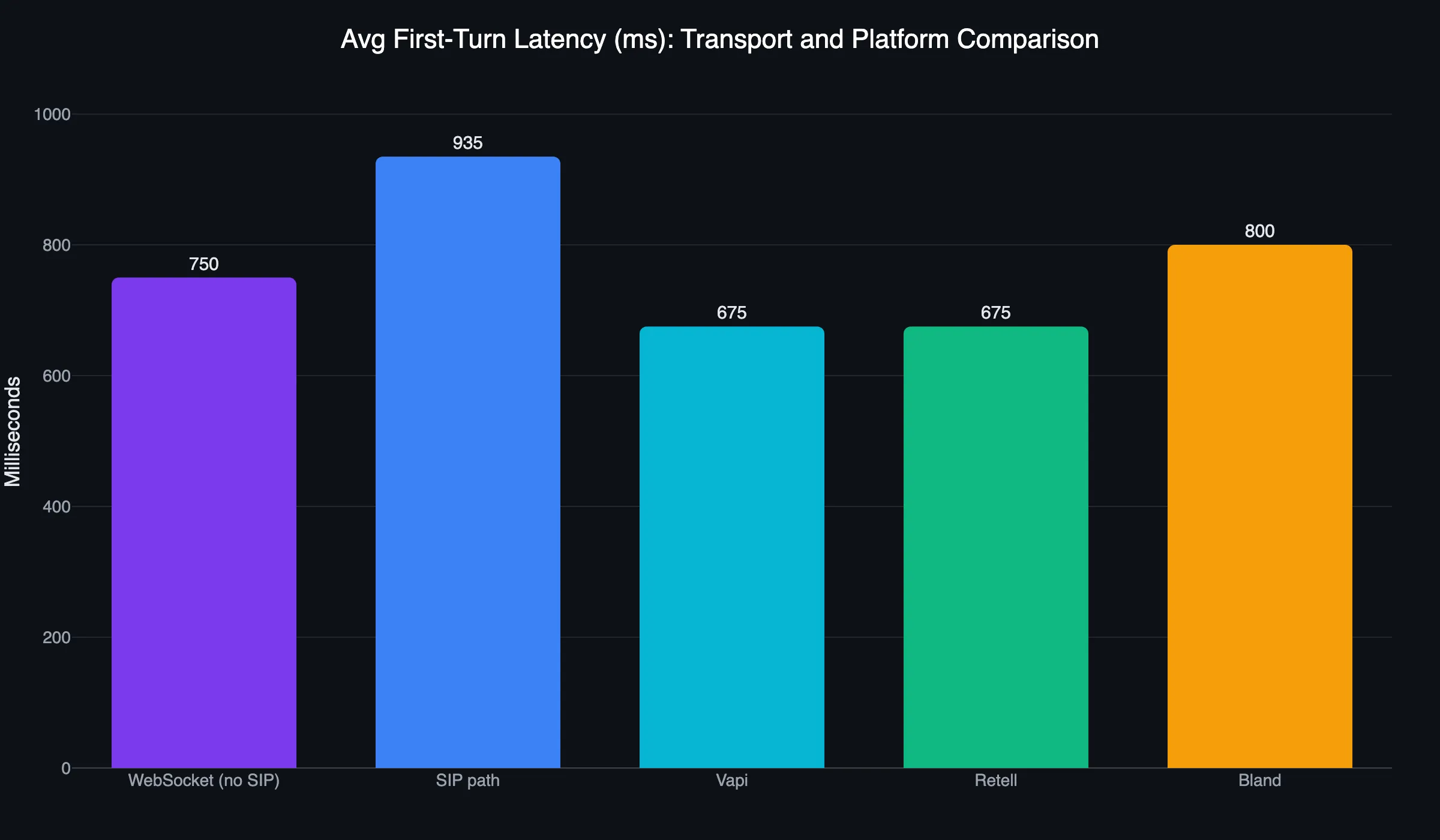
- The no-SIP WebSocket path delivers 450-1,050ms first-turn latency, 140-230ms faster than SIP, per Fora Soft’s 2026 latency measurements.
- Raw OpenAI Realtime API costs $0.18-$0.24/min in model fees alone; Leadlock’s OpenAI Realtime rate is $0.20/min on Pro covering model and infrastructure, with telephony on your own Twilio account.
- Leadlock connects GPT-Realtime-2 to a phone number in 5 minutes with no WebSocket server, no codec resampling, and no SIP trunking required.
OpenAI dropped GPT-Realtime-2 on May 8, 2026, and the Realtime API exited beta the same day. The model runs GPT-5-class reasoning in a native speech-to-speech loop, no text transcription step in the middle. Getting that onto a real phone number answering real calls, without SIP trunking, is a 5-minute operation on Leadlock or a few hours of WebSocket server work if you’re building the plumbing yourself.
Leadlock runs OpenAI Realtime as a native model option at $0.20/min on Pro. Connect your Twilio account and import a number. No codec resampling servers. No SIP. If you want GPT-Realtime-2 answering calls today, that’s the shortest path. The rest of this post covers what the model can do, how the DIY WebSocket path works, and where the cost and latency math lands.
What Is GPT-Realtime-2 and What Changed?
GPT-Realtime-2 is OpenAI’s native speech-to-speech model built on GPT-5-class reasoning, with a 128,000-token context window (up from 32K in the previous version) and a 15.2% improvement over its predecessor on the Big Bench Audio benchmark at the high effort setting, released May 8, 2026 alongside GPT-Realtime-Translate and GPT-Realtime-Whisper, with audio going in, audio coming out, and full multimodal reasoning at every step. No intermediate transcription.
The three models released together:
- GPT-Realtime-2: the flagship. GPT-5-class reasoning, 128K context. Handles complex sales calls, multi-step intake, and dynamic branching.
- GPT-Realtime-Translate: real-time speech translation. Same audio-in/audio-out path, different output language.
- GPT-Realtime-Whisper: transcription-optimized variant. Best used alongside the main agent for call logging and analytics.
The biggest practical change from the previous version: adjustable reasoning effort levels. Set effort per session. A quick appointment confirmation runs low-effort to minimize latency. A multi-step booking flow runs high-effort for accuracy. You tune the model, not the infrastructure.
How to Connect GPT-Realtime-2 to a Phone Number Without SIP
Connecting GPT-Realtime-2 to a phone number without SIP requires a telephony carrier with WebSocket media streaming support, a WebSocket server that resamples PSTN audio to the format OpenAI expects, and an active OpenAI Realtime API session that streams audio frames in both directions. The full path from phone ring to model response is 5-8 hops, but you only write code for the WebSocket bridge layer.
Here’s how the path works:
- Caller dials your provisioned phone number (Twilio, Vonage, or similar carrier)
- Carrier routes the call to your WebSocket server via Media Streams
- Your server receives G.711 audio (8kHz, 8-bit) from the PSTN
- Server resamples to 24kHz PCM16 (what OpenAI Realtime expects)
- Audio frames stream to OpenAI Realtime API over WebSocket
- OpenAI Realtime returns audio response frames
- Server resamples back to G.711 and returns audio to the caller
Twilio’s official Node.js tutorial and Python/FastAPI version cover this exact path with no SIP trunking on your side. Twilio handles PSTN-to-WebSocket translation via Media Streams.
OpenAI’s Agents SDK transport layer documentation recommends against SIP for new Twilio builds. The SDK includes a dedicated Twilio transport extension that handles interruption timing automatically. If you use the generic WebSocket transport instead, you manage turn detection and barge-in logic yourself.
Pro Tip: The codec resampling step (G.711 at 8kHz to PCM16 at 24kHz) is where most DIY builds get tripped up. Fora Soft’s 2026 integration guide has a complete breakdown of the audio pipeline, including the latency budget by transport layer. Read it before you start the build.
What Is the Latency of GPT-Realtime-2 on a Phone Call?
End-to-end latency for GPT-Realtime-2 on a no-SIP WebSocket phone path runs 450-1,050ms on the first turn and 400-800ms on subsequent turns, compared to 590-1,280ms on a SIP-routed path where the extra signaling hop adds 140-230ms, according to Fora Soft’s 2026 latency measurements. The WebSocket path is faster on both metrics and stays inside the 1,200ms threshold where callers start perceiving unnatural pauses.
Callers notice even short pauses, and a long one makes the call feel dead. A well-tuned WebSocket path with low-effort reasoning keeps pauses short. High-effort sessions with complex tool calls can push through.
Leadlock runs true speech-to-speech: audio in, one model, audio out, with no separate transcription and text-to-speech chain. The PSTN transport layer and model reasoning still add latency. Architecture matters here. The comparison between speech-to-speech vs pipeline voice agents covers why the STT → LLM → TTS orchestration path can’t match a native audio model at the latency level.
GPT-Realtime-2 Pricing: What Does It Actually Cost Per Minute?
Running GPT-Realtime-2 through the raw OpenAI API costs approximately $0.18-$0.24/minute in model fees based on typical inbound call token counts, per Fora Soft’s 2026 cost analysis, and that figure does not include telephony, infrastructure hosting, or platform fees. For context: a loaded human call center agent costs $0.25-$0.50 per minute. At 10,000 minutes per month, raw GPT-Realtime-2 runs $1,800-$2,400 in model cost before you add anything else.
Add Twilio (about $0.013/min inbound including Media Streams, plus $1.15/month per local number at Twilio’s US rates), hosting for your WebSocket server, and engineering time. The all-in number climbs before you process a single call.
| Option | Model | Telephony | Infra | Total / 10K min |
|---|---|---|---|---|
| DIY (raw OpenAI + Twilio) | ~$2,000 | ~$131 | ~$100 | ~$2,231 |
| Vapi (OpenAI Realtime) | BYOK | pass-through | included | ~$1,500-$3,300 ($0.15-$0.33/min all-in) |
| Retell (OpenAI Realtime) | component | ~$0.015/min | included | ~$1,300-$2,000+ ($0.13-$0.20+/min, plus add-ons) |
| Leadlock (OpenAI Realtime) | included | your own Twilio account | included | $2,000 on Pro + ~$131 Twilio + $497 plan fee = ~$2,628 |
At this volume the DIY build comes in about $400 a month below Leadlock on the bill, before you count the engineering time to build and maintain it, and Retell’s quoted range also sits below Leadlock’s total. The Retell row carries a footnote: knowledge base queries, branded caller ID, PII removal, and batch dialing each appear as separate line items. Leadlock’s per-minute rate carries no per-feature add-ons.
If OpenAI Realtime’s price point is the constraint, Leadlock also runs Gemini Live and Grok Voice at $0.12/min on Pro. Same single-step audio architecture, different model. The AI voice agent platform pricing breakdown compares all-in rates across the category.
What Can You Build With GPT-Realtime-2 on a Phone Number?
GPT-Realtime-2 on a phone number handles any call type where the conversation needs to branch dynamically, carry context from earlier in the call, or run multi-step reasoning before responding. The 128K context window holds full customer history, product context, or a knowledge base within a single session without truncating. Inbound receptionist, outbound lead follow-up, after-hours triage, appointment reminders, and multi-step intake are all call types it can handle.
Practical deployments include:
- Inbound receptionist answering, qualifying, booking, and routing 24/7
- Outbound lead follow-up dialing a list, qualifying on the call, booking to a calendar
- After-hours triage for trades, escalating emergencies to on-call staff and scheduling non-urgent jobs
- Multi-step intake for booking requests and sales discovery (Leadlock is not HIPAA compliant and does not sign a BAA, so keep patient health information off these calls)
CallSphere’s production deployment runs GPT-Realtime-2 across 14 healthcare tools including insurance verification and appointment booking, with multi-agent handoffs via the OpenAI Agents SDK without dropping audio and 57+ language support.
For high-volume, lower-complexity calls where price per minute is the primary driver, Gemini Live or Grok Voice on Leadlock at $0.12/min is the right model. For calls requiring complex branching and full GPT-5-class reasoning, OpenAI Realtime at $0.20/min is the call.
How Do You Set Up a GPT-Realtime AI Receptionist for Your Type of Business?
The deploy steps are the same for every business: create the agent, pick OpenAI Realtime, import a number, test. What changes is the prompt. This table lists, for each business type, the calls a receptionist agent usually takes and the calls it should pass to a person. Use the row as the starting point for your prompt. It runs on the same speech to speech voice AI whatever the business.
| Business type | Calls the agent takes | Hand to a person when |
|---|---|---|
| Plumbing company | New job requests, address and problem details, booking a visit, hours and service area | Active leak, no water, gas smell or any emergency |
| Cleaning service | Quote requests by home size and service, recurring bookings, reschedules | A complaint about a finished job, or a custom commercial bid |
| Restaurant | Reservations, party size, hours, menu and dietary questions, takeout orders | Large parties, private events, allergy questions the menu does not answer |
| Fitness studio | Class times, trial bookings, membership questions, cancellations policy | Billing disputes and injury or medical questions |
| Nail salon | Service menu, prices you give it, booking and rescheduling | A complaint or a request for a specific fix after a visit |
| Veterinary clinic | Appointment booking, hours, vaccination and refill requests | Any symptom that could be urgent: send to staff or the emergency line, never advise |
| Orthodontic practice | New patient consult booking, hours, directions, reschedules | Pain, a broken appliance, and anything about treatment or records |
| Funeral home | Hours, directions, service times, taking a message with care | A death has occurred or a family needs to make arrangements: transfer at once |
| Mortgage broker | Loan type and property questions, contact capture, booking a call with a loan officer | Rate quotes, approval questions and any advice on a specific loan |
| Accounting firm | New client intake, document drop-off questions, booking a meeting | Any tax or accounting advice, deadlines for a specific return |
| Financial advisor | Prospect intake, meeting booking, office questions | Anything about investments, accounts or advice |
| Recruiting agency | Candidate and client intake, interview scheduling, role basics you give it | Offers, pay negotiation and feedback on a candidate |
| Apartment complex | Leasing inquiries, tour booking, logging routine maintenance requests | Emergencies such as flooding, no heat or a lockout, and lease disputes |
| Event venue | Date availability, guest count, package basics, booking a tour | Custom quotes, contracts and day-of changes |
Three rules apply to every row. Give the agent only prices and policies you have written down for it. Tell callers they are speaking with an AI assistant. And Leadlock is not HIPAA compliant and does not sign a BAA, so keep patient health information off these calls.
Leadlock vs Building It Yourself
The DIY path works. Twilio Media Streams handles the PSTN-to-WebSocket layer, the OpenAI Agents SDK handles the model connection, and the Fora Soft build guide gets you through the codec specifics. Budget a few hours on the initial build, then ongoing time on latency debugging, codec issues, carrier failover, and model version migrations as OpenAI ships updates.
Leadlock is live in 5 minutes. OpenAI Realtime is a native model option. Run the setup wizard, configure your agent prompt, select the model, connect your Twilio account and import a number, done. No WebSocket server. No G.711 resampling. No Media Streams code to maintain.
Vapi, Retell, Bland, and Synthflow all wrap orchestration-layer architectures even when they offer OpenAI Realtime as a model option. They add overhead to an audio path that was designed to be direct. Leadlock routes audio natively: Audio In → OpenAI Realtime → Audio Out. For GHL agencies managing agents across multiple sub-accounts, the OpenAI Realtime API voice agents for GoHighLevel guide covers the setup specifics.
Building with Claude Code? The Leadlock Agent Kit is a library of Claude Code skills that build, test and tune Leadlock voice agents through the API.
Frequently Asked Questions
Q: How do I connect GPT-Realtime-2 to a phone number without SIP?
Use a telephony carrier that supports WebSocket media streaming. Twilio Media Streams is the most documented option. Your WebSocket server receives G.711 audio from the PSTN, resamples to 24kHz PCM16, and streams frames to the OpenAI Realtime API. The OpenAI Agents SDK includes a Twilio transport extension that handles interruption timing automatically. Leadlock connects GPT-Realtime-2 to a phone number in 5 minutes with no WebSocket server required.
Q: What is the difference between WebSocket, WebRTC, and SIP for GPT-Realtime-2?
WebSocket is the recommended transport for server-side phone pipelines where audio routes through your server before reaching OpenAI. WebRTC is for browser-based voice where audio travels from the user’s microphone directly to OpenAI without a server hop. SIP is a legacy signaling protocol used in enterprise telephony. OpenAI supports all three, but recommends WebSocket for new Twilio-based phone deployments. SIP adds setup complexity without meaningful latency benefit.
Q: How much does GPT-Realtime-2 cost per minute on a phone call?
The raw OpenAI API charges approximately $0.18-$0.24/minute for GPT-Realtime-2 in model fees based on typical call token counts. That number excludes telephony, infrastructure, and platform costs. Leadlock’s OpenAI Realtime rate is $0.20/minute on Pro, covering model and infrastructure, with telephony on your own Twilio account. If Gemini Live or Grok Voice fits your use case, Leadlock’s rate drops to $0.12/minute.
Q: Can I use GPT-Realtime-2 with Twilio or other telephony providers?
Yes. Twilio is the most documented path via Media Streams and WebSocket. OpenAI and Twilio co-published official tutorials in Node.js and Python. Voximplant has a working production demo connecting OpenAI Realtime directly to real phone numbers using their serverless media conversion layer. Any carrier that supports WebSocket media streaming works. SIP trunking is supported but adds configuration overhead and an extra signaling hop.
Q: What is the time-to-first-audio latency of GPT-Realtime-2 on an inbound call?
First-turn latency on a WebSocket phone path runs 450-1,050ms, versus 590-1,280ms on a SIP-routed path. Subsequent conversational turns run 400-800ms, according to Fora Soft’s 2026 latency measurements. Callers notice even short pauses. The PSTN transport layer adds latency based on carrier and geography.
Q: How does GPT-Realtime-2 compare to Vapi or Retell for production phone agents?
Vapi and Retell support OpenAI Realtime as a model option but route audio through orchestration layers rather than a native speech-to-speech path, so each reply makes extra hops. Both add platform fees and per-feature charges. Retell’s knowledge base, branded caller ID, PII removal, and batch dialing each appear as separate line items. Leadlock runs OpenAI Realtime at $0.20/min on Pro with a native audio path from your Twilio number to the model.
Ready to get GPT-Realtime-2 on a phone number without the plumbing? Leadlock runs OpenAI Realtime at $0.20/minute on Pro, live in 5 minutes, no SIP required. Book a 15-minute call with Dan.
See It Book a Real Job
Voice agents that book into ServiceTitan and GoHighLevel, live today for home-service brands. Book 15 minutes with Dan, or start a 7-day trial from the pricing page.
Book a 15-minute call with Dan