Call center RPA cuts costs 25–40% and reduces AHT by 35%. Learn the use cases, ROI benchmarks, and why AI voice agents are replacing traditional bots in 2026.
Call centers are drowning in repetitive tasks - data entry, call logging, customer authentication, post-call wrap-up - and it’s costing them millions. The global robotic process automation (RPA) market hit $35.27 billion in 2026 and is projected to reach $247.34 billion by 2035, according to Precedence Research. The contact center industry is one of the biggest drivers of that growth.
But here’s what most guides won’t tell you: much of what gets labeled “call center RPA” is quickly becoming a floor, not a ceiling. The real transformation in 2026 isn’t just automating repetitive clicks - it’s replacing the entire agent workflow with AI voice agents that handle calls from start to finish. That’s where Leadlock comes in: true speech-to-speech AI voice agents that go far beyond what traditional RPA can do, from $0.12 per minute on the $497/month Pro plan, with plans starting at $97/month.
This guide covers everything you need to know about call center RPA - what it is, what it automates, what ROI it delivers, and why forward-thinking contact centers are now pairing (or replacing) traditional RPA with AI voice agents for end-to-end automation.
What Is Call Center Robotic Process Automation?
Call center robotic process automation (RPA) uses software bots to handle repetitive, rule-based tasks that agents would otherwise perform manually - logging into systems, copying data between applications, filling out forms, triggering workflows, and updating records - all without human intervention.
Traditional RPA doesn’t involve AI or judgment. It follows a defined script: “If X happens, do Y.” That’s both its strength (reliability, accuracy) and its weakness (can’t handle exceptions or unstructured data).
In a contact center context, RPA operates in three modes:
- Attended RPA - Bots assist agents during live calls, surfacing information or completing data entry in real time
- Unattended RPA - Bots run in the background after calls end, processing work without agent involvement
- AI-enhanced RPA - Combines traditional bots with machine learning or NLP for more complex tasks like summarization or sentiment detection
According to Bland.ai’s RPA analysis, over 60% of contact centers were expected to implement some form of RPA by 2025 - and those projections have held true heading into 2026, with AI-enhanced automation now leading new deployments.
What Tasks Can RPA Automate in a Call Center?
RPA in call centers automates five primary categories of repetitive, rule-based work - data entry and system updates, call transcription and summarization, customer authentication, IVR and chatbot deployment, and data reconciliation and reporting - completing these tasks faster and with fewer errors than human agents while freeing staff for complex, judgment-intensive interactions, according to Five9:
- Data entry and system updates - Bots pull customer data from CRMs, billing systems, and databases and populate fields automatically during or after calls
- Call transcription and summarization - After-call work (ACW) consumes 25–30% of total agent time; RPA bots auto-generate call summaries and log them directly to the CRM
- Customer authentication - Identity verification processes save 30–45 seconds per call when automated, according to Callin.io
- Chatbot and IVR deployment - Front-office RPA handles initial customer interactions through automated menus and self-service flows
- Data reconciliation and reporting - Back-office bots match records across systems, generate compliance reports, and flag discrepancies
The Call Centre Helper Executive Guide separates this into front-office (customer-facing) and back-office (operations) automation - with back-office often delivering faster, more measurable ROI because the tasks are more uniform and exceptions are rare.
Post-call work is the single biggest automation target. When 25–30% of agent time disappears into logging notes, updating tickets, and sending follow-up emails, even partial automation produces immediate cost savings.
What ROI Can You Expect from Call Center RPA?
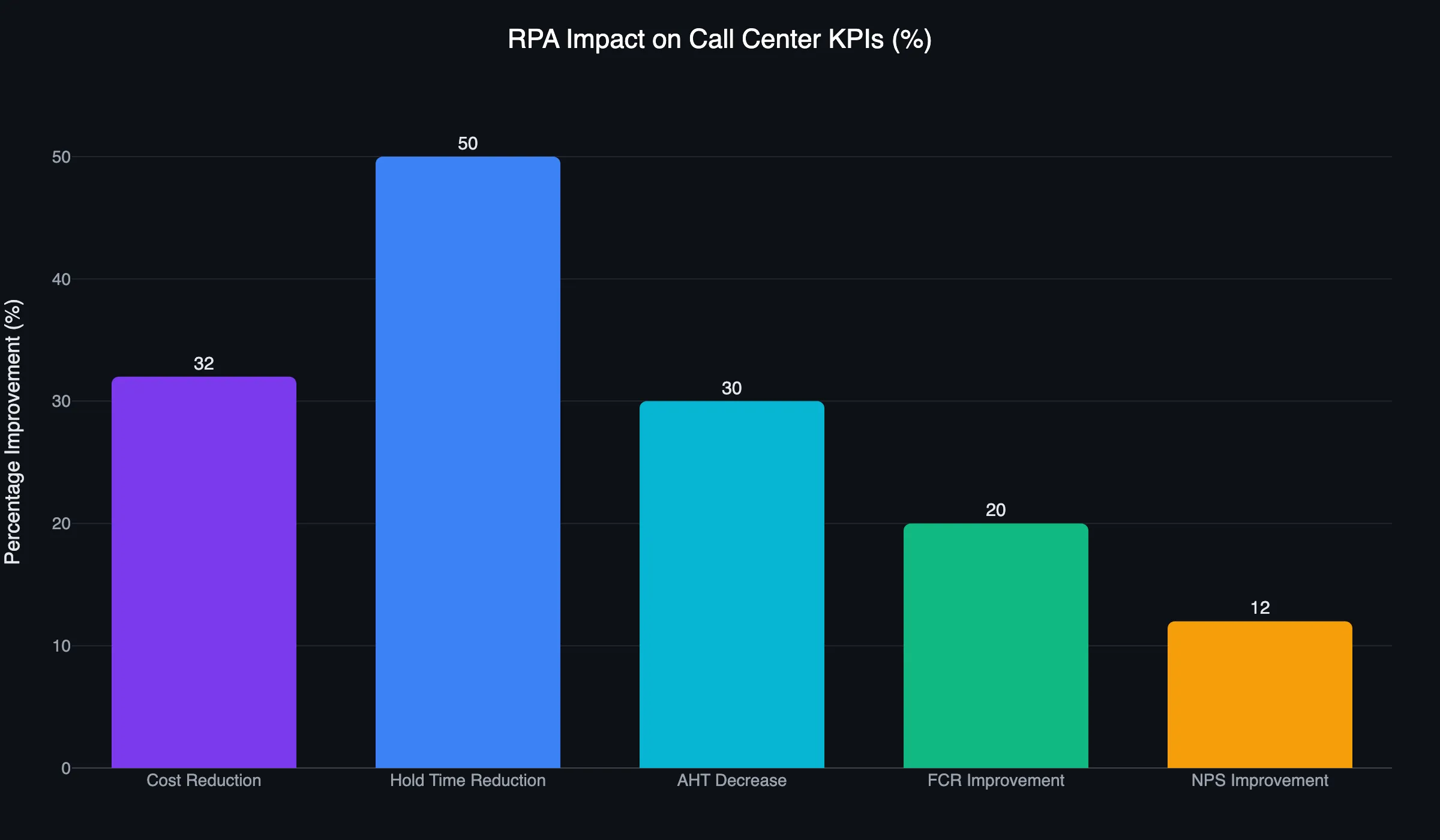
Call center RPA consistently delivers measurable, documented ROI across cost, speed, and quality - with research from Callin.io showing 25–40% cost reductions, 25–35% decreases in average handle time, 40–60% reductions in hold time, and 15–25% improvements in first-contact resolution, typically within the first 12 months of deployment at high-volume contact centers.
| Metric | Typical Improvement |
|---|---|
| Cost reduction | 25–40% |
| Average handle time (AHT) | 25–35% decrease |
| First-contact resolution | 15–25% improvement |
| Hold time reduction | 40–60% |
| NPS improvement | 10–15 points |
| Agent turnover (example) | 35% → 22% |
The turnover stat deserves attention. Call centers suffer 30–45% annual turnover rates - double the industry average - according to Retell AI’s contact center automation trends report. Yet 89% of agents report greater job satisfaction when automation handles repetitive tasks. RPA doesn’t just cut costs; it makes agent jobs less miserable, reducing churn and the $15,000–$30,000 cost of replacing each departing employee.
From a financial perspective, Deloitte’s Global RPA Survey found 61% of businesses reported successful cost reductions from RPA, with pilots averaging a 9-month payback period and scaled rollouts averaging 12 months. That’s a compelling business case in any high-volume contact center environment.
Pro Tip: The fastest path to RPA ROI is starting with after-call work (ACW) automation. It’s entirely back-office, agents love it immediately, and the time savings show up on your metrics within weeks - not months. Once that pilot proves out, expand to authentication and data entry automation.
Real-World Call Center RPA Results
Vehicle Insurance Provider (UiPath)
An insurance company deployed AI agent-based verification using UiPath automation and achieved a 245% ROI alongside a 62% reduction in claims processing duration, according to Accelirate’s case study compilation. Claims processing is an ideal RPA candidate: high volume, rule-based steps, and significant downstream costs when delayed.
AIS Telecom (Thailand)
AIS automated 560 use cases using RPA - saving 197 full-time equivalent (FTE) roles and reducing employee workload by 72,000 work hours in their operations division. They also trained 800 employees as citizen developers, embedding automation capability throughout the organization rather than centralizing it in IT.
TLF Graphics
TLF Graphics deployed accounts payable automation 89% faster than typical RPA rollouts using UiPath AI agents for invoice intake, per Accelirate’s research. Speed of deployment matters - traditional RPA implementations can drag on for months, eating directly into expected ROI.
How Does RPA Compare to AI Voice Agents for Call Centers?
Traditional RPA is powerful for back-office and desktop automation - handling data entry, post-call summaries, and CRM updates with speed and accuracy - but it hits a hard ceiling at the voice layer, where AI voice agents take over and where organizations using agentic AI now report 3x faster resolution and 50% higher customer satisfaction compared to traditional automation alone, according to Retell AI.
Here’s the architecture problem with most “AI voice” solutions on the market today:
Legacy AI Voice Pipeline (Vapi, Retell, Bland, Synthflow, Assistable): Speech-to-Text → LLM → Text-to-Speech (3 separate API calls, each adding delay)
Leadlock’s True Speech-to-Speech: Audio In → Native Multimodal Model → Audio Out (1 step, about 300ms replies on Grok)
The difference isn’t subtle. A pause on every exchange makes conversations feel robotic and unnatural. Leadlock agents reply in about a third of a second on Grok (median of 461 live turns, measured September 2026), close to the pace of a human agent - and that directly impacts whether customers stay on the line or hang up frustrated.
| Capability | Traditional RPA | Legacy AI Voice | Leadlock |
|---|---|---|---|
| Voice conversations | No | Yes (latency varies by stack) | Yes, ~300ms reply (Grok, median) |
| After-call data sync | Yes | Partial | Yes (native GoHighLevel sync; other CRMs via post-call webhook or API) |
| Live data lookup | Limited | Yes | Yes |
| Cost per minute | N/A | $0.13–$0.33 all-in | From $0.12/min on Pro, plus plan fee |
| Setup time | Weeks–months | Days | Under 5 minutes |
| GoHighLevel integration | No | Limited | Native |
| Latency source | N/A | 3-step pipeline | 1-step multimodal |
The advertised rates from competitors often look low - $0.05–$0.09/minute is common. But that’s before you add STT, LLM tokens, TTS, and telephony costs. The real all-in cost of a legacy AI voice pipeline runs $0.13–$0.33/min or more. Leadlock’s rate is all-in: from $0.12/minute on Gemini on the $497/month Pro plan ($0.18 on the $97/month Starter plan), with no hidden API fees.
A 1,000-minute/month contact center using Leadlock pays $277/month on Gemini on the Starter plan ($97 + 1,000 x $0.18). That same volume on a legacy pipeline typically runs $130-$330/month in usage alone ($0.13-$0.33/min) when you account for all API costs honestly.
What Are the Main Deployment Models for Call Center RPA?
Before implementing RPA, contact center leaders need to choose between three primary deployment models - attended automation for real-time agent support during live calls, unattended automation for background and after-hours processing, and AI voice agent automation for handling entire conversations without human involvement - since the right choice depends on where agent time is being lost and which bottlenecks hurt revenue most.
Attended Automation works best for agents handling complex calls with lots of system lookups. The bot assists the agent in real time - auto-filling fields, surfacing scripts, pulling account history - but a human drives the call.
Unattended Automation is ideal for after-hours processing: generating call summaries, updating CRM records, sending follow-ups, and running compliance checks. The agent ends the call; the bot finishes the paperwork.
AI Voice Agent Automation - the 2026 evolution - removes the human from routine calls entirely. Inbound calls are answered instantly, customers are qualified, appointments are booked, and the CRM is updated without a single agent involved. This is what platforms like Leadlock deliver as a complete solution.
Synthflow’s contact center automation analysis cites Forrester data showing 80% of contact center leaders agree automation helps increase agentless interactions - and 96% predict agents in AI contact centers will eventually handle only specialized or escalated tasks.
The 98% of business leaders planning increased digital and self-service investment within the next 12 months - cited by Retell AI based on Salesforce research - confirms this isn’t a fringe trend. It’s the direction the entire industry is moving.
How to Implement Call Center RPA: Step-by-Step
Implementing call center RPA successfully requires completing seven sequential steps - starting with a rigorous audit of your highest-volume tasks and ending with ongoing optimization - and the 9-month payback period Deloitte documented in their Global RPA Survey depends almost entirely on how thoroughly you execute steps one and two before writing a single line of bot logic.
-
Audit your highest-volume repetitive tasks - Pull 30 days of operational data and map where agent time actually goes. ACW, authentication, and data entry are typically the top three targets.
-
Calculate automation potential - Multiply the average time per task by daily volume. A task taking 2 minutes that occurs 500 times/day equals 1,000 minutes of daily automation potential.
-
Choose your automation tier - Decide whether you need desktop RPA, AI voice automation, or a combination. If live phone calls are your bottleneck, RPA alone won’t solve it.
-
Select your platform - For voice automation specifically, evaluate on latency (true speech-to-speech vs. pipeline), all-in cost per minute (not just the advertised rate), and integrations (native CRM and GHL support for agencies).
-
Start with a pilot - Pick one use case (ACW summarization or inbound qualification work well). Run it for 30 days and measure handle time, cost per interaction, and agent satisfaction scores.
-
Scale and integrate - Once the pilot validates ROI, expand to additional use cases. Connect to your CRM, ticketing system, and scheduling tools for smooth data flow.
-
Monitor and optimize - Track AHT, first-contact resolution, cost per call, and CSAT weekly. Both RPA bots and AI voice agents improve significantly with prompt optimization and better routing logic over time.
The 9-month payback period Deloitte documented assumes a disciplined implementation process. Cutting corners on steps 1 and 2 is the most common cause of failed RPA projects - you can’t automate a process you haven’t fully mapped.
What Are the Limitations of Traditional RPA - and What’s Replacing It?
Standard RPA bots break when processes change. Update a field name in your CRM, redesign a form, or add a new workflow step - and the bot throws an error. This fragility is why many early RPA implementations require significant ongoing maintenance overhead.
Three core limitations define traditional call center RPA:
- No voice capability - RPA bots operate on screens and structured data, not audio. They can’t answer a phone call.
- Exception handling is manual - When something unexpected happens, the bot stops and escalates to a human - creating exactly the queues and delays you were trying to eliminate.
- Integration complexity - Connecting RPA to legacy telephony systems often requires months of IT work, not days.
AI voice agents in 2026 address all three. They handle the voice layer natively, can reason through exceptions using multimodal LLMs, and integrate with modern CRMs in minutes.
The BFSI sector leads RPA adoption at 36.52% of all deployments globally, according to Precedence Research - and these are exactly the industries where the shift from desktop RPA to AI voice agents is happening fastest. Data security is accelerating this: the average data breach now costs $5.52 million, and 56% of contact center leaders cite regulatory compliance as their primary AI implementation driver, per Retell AI. Automation reduces human error, which remains the leading cause of compliance failures.
For contact centers still relying on IVR systems and desktop bots, the IVR to AI Voice Agent Migration Guide is a practical starting point. And for a full breakdown of what modern contact center automation looks like at the platform level, Call Center Automation in 2026: The Complete Guide covers the complete stack. If you want to understand where voice analytics fits into the automation picture, Call Center Voice Analytics in 2026 shows how AI-driven call coverage ties directly into RPA workflows for compliance and quality assurance.
North America holds 38.92% of the global RPA market, according to Precedence Research - and the region’s contact centers are under the most pressure to prove ROI fast. The combination of high labor costs, aggressive competition, and customer expectations that only 13% of consumers will wait less than 5 minutes on hold (per Retell AI) makes automation not optional but existential.
Frequently Asked Questions
Q: What is robotic process automation in a call center?
Call center RPA uses software bots to automate repetitive, rule-based tasks like data entry, customer authentication, after-call summaries, and CRM updates. Bots follow predefined scripts to complete these tasks faster and with fewer errors than human agents, freeing agents for complex or high-value interactions.
Q: How much does call center RPA typically save?
Research from Callin.io shows 25–40% cost reduction in call center operations, with a 25–35% decrease in average handle time. Deloitte’s Global RPA Survey found an average 9-month payback period for pilots and 12 months for scaled rollouts.
Q: What’s the difference between RPA and AI voice agents?
RPA automates desktop and back-office tasks but cannot handle live phone calls. AI voice agents handle the entire phone conversation - answering, qualifying, booking - without human involvement. In 2026, the most effective contact centers use both: AI voice agents for the live call layer and automated data sync for post-call processing.
Q: How long does it take to implement call center RPA?
Simple bots for ACW automation can be live in days. Complex multi-system integrations take weeks to months. AI voice agent platforms like Leadlock go live in under 5 minutes with no SIP trunking required - dramatically faster than traditional RPA deployment timelines.
Q: Is RPA the same as AI?
No. Traditional RPA is rule-based and deterministic - it follows scripts without understanding context. AI adds learning, reasoning, and language understanding. Modern platforms blend both: RPA for reliable structured task automation and AI (including multimodal LLMs) for judgment-dependent tasks like live call handling and exception management.
Q: What call center metrics improve most with RPA?
The biggest gains are in hold time reduction (40–60%), average handle time (25–35% decrease), and agent turnover (35% → 22% in documented cases), per Callin.io. First-contact resolution improves 15–25% as agents shift from admin tasks to higher-value interactions.
Q: What industries use call center RPA the most?
Banking, financial services, and insurance (BFSI) lead with 36.52% of global RPA deployments, according to Precedence Research. Telecoms, healthcare, and retail follow - all high-volume, customer-service-intensive industries with strong ROI cases for automation.
Q: How does Leadlock fit into a call center RPA strategy?
Leadlock handles the voice layer that traditional RPA can’t reach: answering inbound calls, qualifying leads, and booking appointments with about 300ms replies on Grok from $0.12/minute on Pro. It integrates natively with GoHighLevel and books into ServiceTitan, and anything else with an API can be connected through custom functions and the post-call webhook, so post-call data flows automatically - no separate RPA bot required for basic data entry and logging.
Ready to automate your call center from the first ring through to CRM sync? Leadlock delivers true speech-to-speech AI voice agents from $0.12/minute on Pro - no SIP trunking, no three-step pipelines, live in under 5 minutes. Book a 15-minute call with Dan.
See It Book a Real Job
Voice agents that book into ServiceTitan and GoHighLevel, live today for home-service brands. Book 15 minutes with Dan, or start a 7-day trial from the pricing page.
Book a 15-minute call with Dan